All Apps
/
Hide Out of Stock Products in Website | Auto Hide Website Product

Description:
The Auto Hide Website Product module for Odoo automatically manages your eCommerce inventory visibility. It can completely hide products with zero quantity or display an "Out of Stock" badge based on your configuration. Products automatically reappear when stock is replenished. Fully compatible with Odoo Community and Enterprise.
Auto Hide Website Product ( Zero Quantity/On Hand zero Qty )
Work on both Community and Enterprise
Main Features
Hide Products
Completely Hide/Invisible Product on Website once out of stock means Zero On Hand Quantity.
Show Out of Stock
The Product will be visible on Website but show Out of Stock/Not available once out of stock means Zero On Hand Quantity.
Visible Once Stock Back
The Product will be auto visible on Website once stock back.
Configuration
Go to Settings -> General Setting -> Product Website Visibility -> Show Out of Stock/Hide Products

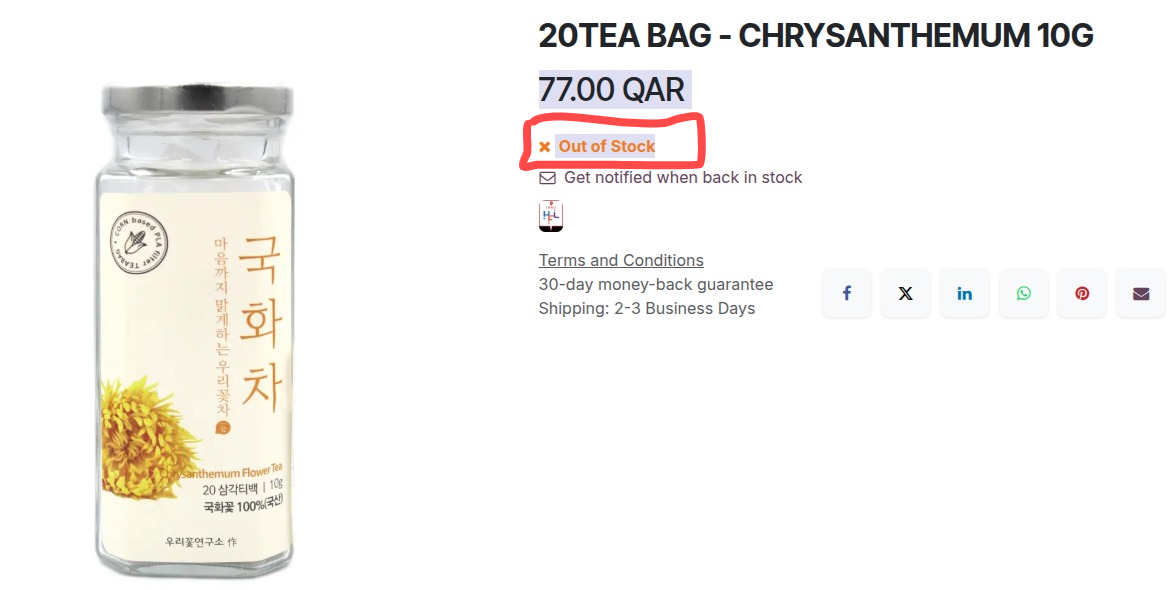
When selection --> Show Out of Stock
- Now Product will be visible but it will show Out of Stock
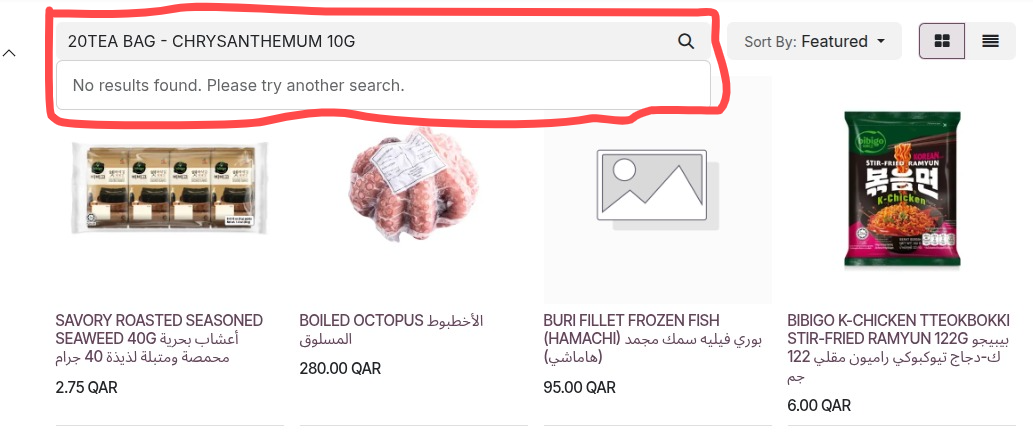
When selection --> Hide Product

- When the Product is out of Stock than it will be Hide/Invisible on Website
When selection --> Default/No Selection/Empty

- The default Product setup nothing will effect